Announcements
See all articlesTurnitin Maintenance - July, 18th 2026 Scheduled for Jul 18, 11:00am EDT - 5:00pm EDT
Turnitin Maintenance - July, 18th 2026 Scheduled for Jul 18, 11:00 am EDT - 5:00 pm EDT
Turnitin will take a 6-hour maintenance on with several services potentially experiencing intermittent availability during these times.
Please prepare prior or after for submissions while the maintenance is in progress- thank you!
StraighterLine Student Support Team
Academic Policies
See all articlesAcademic Policies
StraighterLine’s Academic Policy is designed to ensure a fair, flexible, and supportive learning environment for all students. It outlines essential guidelines related to course enrollment, grading, academic integrity, progress expectations, and student conduct. Our policies are designed to uphold academic standards while providing students with the flexibility to learn at their own pace. The complete Student Code of Conduct provides detailed information on procedures, expectations, and available support resources to help students succeed throughout their learning journey. We encourage all students to review the Academic Policies carefully to ensure they fully understand their rights and responsibilities.
Courses
See all articlesCourses: How do I access my eTextbook?
Most of StraighterLine's courses include a complimentary eTextbook. However, not all courses will have an eTextbook, as some course content is embedded within the course topics. The etextbook is provided digitally as part of course enrollment. Students who prefer a new, used, or rental hard copy are financially responsible for the purchase and can search for the ISBN to find available options. To access the eTextbook, click on the first reading assignment in the course. From there, you can create a bookshelf account and read the eTextbook material offline.
Courses: How do I order a Straighterline lab kit?
Lab kits for your course are ordered through eScience Labs.
To order a lab kit:
- Register here.
- Click the “Have a code?” button.
- Enter the kit code found in your course syllabus.
- Complete your purchase.
Please allow up to two weeks for shipping. Ordering your lab kit as soon as possible will ensure you can begin your coursework immediately.
Courses: Enrolling in Straighterline Courses
Enrolling in StraighterLine Courses for the First Time?
Enrolling in courses is simple and can be done anytime on our website.
To enroll:
- Visit StraighterLine.com.
- Navigate to the Courses section and add your desired classes to your cart.
- Proceed to checkout, where you will create an account.
- Select “Not a Student Yet” and create your StraighterLine account.
- Enter your contact and billing information.
- Accept the Terms and Conditions, then continue to checkout.
- Once payment is processed, your course will be available in your Dashboard.
Enrolling in StraighterLine Courses with an Active Membership?
Enrolling in courses is quick and can be done anytime on our website.
To enroll:
- Visit StraighterLine.com.
- Navigate to the Courses section and add your desired classes to your cart.
- Proceed to checkout and login to your StraighterLine account.
- Enter your payment details and access your Dashboard.
- Your courses will be available to start immediately.
Enrolling in StraighterLine Courses with an Inactive Membership?
You can enroll in courses anytime on our website, even if your membership is inactive.
To enroll:
- Visit StraighterLine.com.
- Navigate to the Courses section and add your desired classes to your cart.
- Proceed to checkout and login to your StraighterLine account.
- Accept the Terms and Conditions, then continue to checkout.
- Once payment is processed, your course will be available in your Dashboard.
Courses: How do I get started with my course(s)?
As a first step in any course, we recommend thoroughly reviewing the course syllabus. This will help you familiarize yourself with all course content, including:
- Topics and concepts covered
- Required readings and supplemental resources
- Assignments and activities
- Point allocations
Next, take time to review the course sequencing by clicking through the course. This will give you a clear understanding of what is expected of you.
Finally, carefully review assignment prompts and instructions (including exams and quizzes) to ensure you understand all requirements. This will help you move forward with confidence in completing your coursework.
You can easily access your courses by clicking the center of your course card on your student dashboard.
Courses: Getting Started with Courses
StraighterLine courses are self-paced, allowing you to start immediately upon checkout. With no due dates, you have the flexibility to progress through the course at your own speed. Once you select your course and activate your monthly membership, you can take as little or as much time as needed to complete the material.
Courses: What is Included in my Course?
Each StraighterLine course follows a syllabus that includes various lessons and assessments. The course syllabus is located within the course sidebar, which also contains tutoring, glossary, image index, video index, and AI use in course design.
What are Course Topics?
The topics and components of our courses vary. Each topic includes a lesson that represent the fundamental concepts that you must master to successfully complete the course.
What is included in the Lesson?
- A Lesson Presentation
- Review Activities
- Assignments (graded, and non-graded)
What should I know about Graded Assessments?
Graded assessments are required for completing the course.
All exams and quizzes allow up to three attempts, with a 15-minute interval between each.
Your highest score will be applied to your final grade.
The final exam is limited to one attempt. Once you submit a quiz or exam, answers cannot be changed. You will receive a final course score after completing all assessments and required assignments.
Grading
See all articlesGrading: How do I see my graded assignment?
To view your graded assignments:
- Click on the center of your course card.
- On the next page, you’ll see a course progress bar and a list of required assignments.
- Select the course topic where your assignment is located.
- Navigate to your assignment and click on the assignment link.
- After clicking the link, you’ll be directed to the Turnitin Feedback Studio, where you can review your assignment score, the grader’s feedback, and the grading rubric used to assess your work.
Grading: Assignment Resubmission Policy
All qualitative assignments (e.g., essays, videos, lab work, or any other assignment that is not a multiple-choice quiz or exam) are submitted through Turnitin. Be sure to follow the formatting instructions mentioned in your assignment, or if provided, use the instructions in the “Upload Document” section to ensure your submission is in a readable format. Your file should be a .docx or .pdf to prevent grading delays. You have two attempts on each written assignment. These assignments are graded individually in the order they are received. Grades, along with any specific feedback, will be posted to your assignment through Turnitin.
Content: All qualitative assignments are submitted through Turnitin. These are assignments outside of quizzes or exams, including, but not limited to, essays, videos, lab work, and presentations. Because of this variation, you must review each assignment prompt for its specific requirements. As a general rule, unless otherwise noted:
- Your assignments should be submitted as .docx or .pdf attachments.
- You have two attempts on each assignment.
- Assignments are graded individually in the order they are received.
- Faculty will provide comprehensive feedback and post grades to your assignment through Turnitin.
To submit your assignment for grading, follow these steps:
- Locate the assignment in your course by clicking on the Assignment Title.
- Click on the “My Submissions” tab.
- Follow the instructions to upload your assignment.
Grading: Identity Verification
StraighterLine works diligently to verify student identity, ensuring that the individual who registers is the same student who completes the course, requests a transcript, and receives credit for their work. This identity verification process also demonstrates that our academic policies align with the practices of higher education, lending legitimacy and authenticity to our courses and the credits earned. This is important information for both our current and potential partners, as well as for institutions receiving a StraighterLine transcript.
Please understand that identity verification is not intended to hinder your academic progress. Rather, it is in place to provide our partners and your future college with confidence that you are a capable and trustworthy student who has completed the coursework.
Identity verification includes but is not limited to, processes such as out-of-band methods (like calling or texting a number to verify student information), embedded question verification (answering questions based on publicly available details about the student), biometric verification, passive activity monitoring, analysis of voluntarily-provided electronic device data, and account comparison against publicly available networks (like social networks) within StraighterLine’s authentication system.
Grading: Academic Honesty and Integrity
Honesty and integrity are as highly valued at StraighterLine as they are at all of StraighterLine’s partner colleges. Academic integrity violations include all forms of academic dishonesty, including, but not limited to:
- Cheating - Giving or receiving unauthorized assistance, attempting to give or receive such assistance, or using unauthorized materials in connection with the performance of any academic work. This includes providing your login to another individual to access content and complete work on your behalf.
- Plagiarism - Use of another person’s work or ideas without proper acknowledgment of the source.
- Fabrication - Falsification or invention of any information, citation, data, images, or documentation.
- Collusion - Helping or allowing another student to commit any act of academic dishonesty.
Plagiarism, cheating, or other types of academic integrity and policy violations may constitute immediate failure of the assignment in question. Deliberate or sustained violations will result in automatic failure of the course and could result in a student being removed from all current enrollments and services without refund. StraighterLine reserves the right to audit any and all student work for potential cheating, as well as require additional monitoring of students whose accounts have been flagged for suspicious behavior.
Grading: Required Assignments
Students must submit all required assignments in order for a course to be considered “complete”. As we are a self-paced, self-driven platform, there is no official beginning and end to courses. Thus, finishing all required assignments lets us know when you are done with a course. As well, it is the completion of all required coursework that triggers transcript availability. For more information on our Course Completion Policy please see the Student Handbook
Grading: Grading Scale
StraighterLine provides a letter and number grade for each course. Colleges have their own policies with respect to how and whether they'll post grades for transferred coursework. You should check with the college you plan to attend to determine its specific grade-posting policies. Your StraighterLine transcript will reflect the percentage score and corresponding grade* as set forth below:
| SCORE | GRADE |
| 90-100 | A |
| 80-89 | B |
| 70*-79 | C |
| 60-69 | D |
| Below 60 | E |
*A grade of at least 70% is required for ACE CREDIT recommendation or credit recognition at most StraighterLine partner colleges. ACE transcripts reflect P/F (Pass/Fail) only.
Membership
See all articlesMembership: StraighterLine Pricing Plans
StraighterLine Offers Various Pricing Plans - Choose the best plan option that works for You!!
- Pay As You Go (Monthly)
- Semester Plan
- Annual Plan
https://www.straighterline.com/pricing
=StraighterLine Pricing | Affordable Online College Courses
Explore flexible pricing for online college courses. With Pay as You Go, Semester, and Annual Plans —StraighterLine makes earning college credit affordable and stress-free.
Membership: Why is StraighterLine so affordable?
StraighterLine offers fully online learning experiences without the institutional overhead typically associated with colleges or universities. This enables us to provide high-quality, self-paced courses at an affordable price.
Membership: What do I have access to without a StraighterLine Membership?
What features are available in the Student Dashboard without an active membership?
- View and request transcripts
- Access Help Center resources
- Review your past purchase history
- Manage your account settings
- Renew your StraighterLine membership
Application Fees & Admission requirements
See all articlesApplication Fees & Admission Requirements: Are there any application fees and admission requirements?
No. There are no application fees or admission requirements.
Transcripts
See all articlesTranscripts: StraighterLine & ACE Transcript Requests, & Processing
Requesting Your Transcript (StraighterLine or ACE):
Log in to your student dashboard and click the Transcript icon on the left-hand side.
Select your transcript destination from the drop-down menu.
- If your school or institution is not listed, type the name into the box and click the “+” icon to add it.
- If you are requesting an ACE Transcript, be sure to select "American Council on Education (ACE)" from the drop-down menu.
Choose your delivery method (email or mail), and enter the appropriate contact details for your destination.
Processing Your Transcript:
Once submitted, our Transcript Processing Team will review and process your request:
- If it’s a partner institution, we’ll send it to your school's preferred address.
- If it’s not a partner, we’ll send it using the contact info you provide.
ACE Transcripts
If you selected ACE, once your transcript is approved, please allow an additional 7 business days for processing. You’ll receive your ACE digital badge via email from Credly.
Good to Know Info:
- Please allow up to 7 business days for standard transcript processing, plus any additional time required by the receiving institution or for ACE badge delivery.
- Transcript requests are free of charge and can be submitted as often as needed.
Transcripts: How do I request my transcripts?
To request a transcript, log in to your dashboard and click the transcript icon on the left-hand side of the screen. From there, you can select your transcript destination from the drop-down menu. If your school is a partner institution, StraighterLine will handle the rest. If your school is not a partner, you can choose to have your transcript emailed or physically mailed by providing StraighterLine with your institution's contact information. If your school, university, or employer does not accept StraighterLine transcripts, you have the option to request an ACE transcript.
All StraighterLine transcripts are free of charge and can be requested as often as needed. Processing may take up to 7 business days, including additional processing time required by your destination institution.
Transcripts: How do I know if my target destination school accepts StraighterLine courses?
First Step: Confirm Credits Will Transfer To Your School
It's always best to confirm with your target school if they accept alternative college credit --
Straighterline credits have been accepted by more than 3,000 colleges and universities, and most students find that their credits transfer easily to the vast majority of schools. Each school has its own unique credit transfer processes, so your school will let you know whether they’ll accept the credits for the StraighterLine classes you want to take.
The Credit Transfer Process
All StraighterLine courses are recommended by the American Council on Education (ACE), which is a big deal. Colleges and universities look for the ACE seal of approval when accepting credit from online platforms, so StraighterLine's ACE approval rating is a huge first step to ensuring your courses meet the highest standards fast-tracking your degree.
ACE CREDIT® helps students earn academic credit for courses and exams taken outside traditional degree programs, including military education. StraighterLine courses have been evaluated and recommended for college credit by ACE CREDIT®. Upon completing a StraighterLine course, you become eligible to receive either an ACE Transcript or a StraighterLine Transcript for credit transfer. Additionally, your ACE Transcript may be used for board licensure, credentialing, and certification, subject to approval by your program advisor.
Transcripts: Can I Request a transcript without an SL membership?
Yes, transcripts can be requested at any time and do not require an active membership.
Cancellation Policy
See all articlesCancellation Policy: Can I cancel my StraighterLine Membership before all my assignments are graded?
Yes. If you have completed your coursework, you may cancel your membership before your final assignment(s) are graded and a final grade is posted to your course.
If you need to resubmit an assignment based on feedback or do not pass the course and wish to retake it, you will need to renew your membership to regain access.
Cancellation Policy: How do I cancel My Membership?
To cancel your membership, follow these steps:
- Log in to your student dashboard and click the Account Settings icon on the left side of your screen.
- Select Billing Preferences and complete the Membership Cancellation process.
- Once your cancellation is processed, you will receive a confirmation email. Be sure to note the date your billing cycle ends, as this will be the last day you can access your courses.
Cancellation Policy: Do I have access to my course(s) after I cancel my StraighterLine Membership?
If you cancel your membership, you will retain access to your courses until the end of your billing cycle. If you cancel before your next billing date, your access will continue until that date.
For example, if you cancel on September 2nd and your next billing date is September 17th, you will have 15 days of continued course access before your account fully expires.
Cancellation Policy: What happens if I cancel my StraighterLine membership without completing my course(s)?
If you cancel your membership before completing your courses, your progress will be saved and can be resumed when you return, provided the course has not expired. If the course has expired, you will need to upgrade to the latest version before continuing.
Note: To request an upgrade for an expired course, email support@straighterline.com with the subject "Course Upgrade Request." Please allow 3-5 business days for the Support Team to respond to your request.
By submitting a Course Upgrade Request, you are selecting to be moved to a new version. Be advised: American Council on Education (ACE) compliance does not permit us to transfer grades from one course version to another. Therefore, course upgrades will result in the loss of any previous progress.
Course Upgrades are free of charge and will not impact your membership.
Cancellation Policy: Can I cancel at any time?
There is no long-term commitment with StraighterLine.
You can start or stop your Monthly Membership at any time and restart when you are ready.
StraighterLine Nursing
See all articlesStraighterLine Nursing: What classes do I need to take to satisfy my Nursing prerequisites?
Nursing Prerequisites Starting at $79
We've compiled a list of the most common online nursing prerequisite courses available at StraighterLine to help you select the right ones for your degree program. Our courses start at just $79 and include complimentary eTextbooks.
Fulfill ASN & BSN Degree Requirements
In addition to meeting specific nursing prerequisites, our courses are designed to satisfy general education requirements for Associate (ASN) and Bachelor's (BSN) degree programs in nursing. We have partnered with nursing programs that guarantee credit transfer for StraighterLine courses, and we remain a preferred choice for nursing programs beyond our partner network. For a list of nursing programs that have partnered with StraighterLine, click here.
Explore our transfer credit guide to learn more about transferring credits to your nursing degree program or school.
Exams
See all articlesExams: How to Prepare for my Final Exam?
Introducing Honorlock for Final Exams
To ensure exam integrity and a secure testing environment, we are implementing Honorlock for all final exams. This tool creates a controlled online testing environment that verifies identification and helps prevent cheating and unauthorized access to external resources during your exam.
What Is Honorlock?
Honorlock is a browser extension designed specifically for online testing. When you use it to take a StraighterLine final exam:
- You must use a laptop/desktop computer with Chrome browser
- You must verify your identity through photo and ID verification
- You cannot open unauthorized websites, tabs, or applications
- You cannot copy/paste, print, or take screenshots
- You cannot use a second monitor
This ensures that all students are tested under the same secure conditions.
Honorlock DOES NOT
- Have a live proctor watching you
- Prevent you from accessing your course—you can still access your course materials and eTextbooks as all exams are open book
- Require an exam password
Why StraighterLine Is Adding This
Our goal is to maintain the highest standards of academic integrity while ensuring a fair testing experience for every student. Honorlock helps protect the value of your work and the credibility of your course achievements.
When Will This Be Required?
Starting in early February 2026, all quantitative final exams in StraighterLine courses will require Honorlock. You will not be able to begin your final exam without first installing the browser extension in a Chrome browser.
How to Start Your Exam with Honorlock
- Navigate to your final assessment in this course.
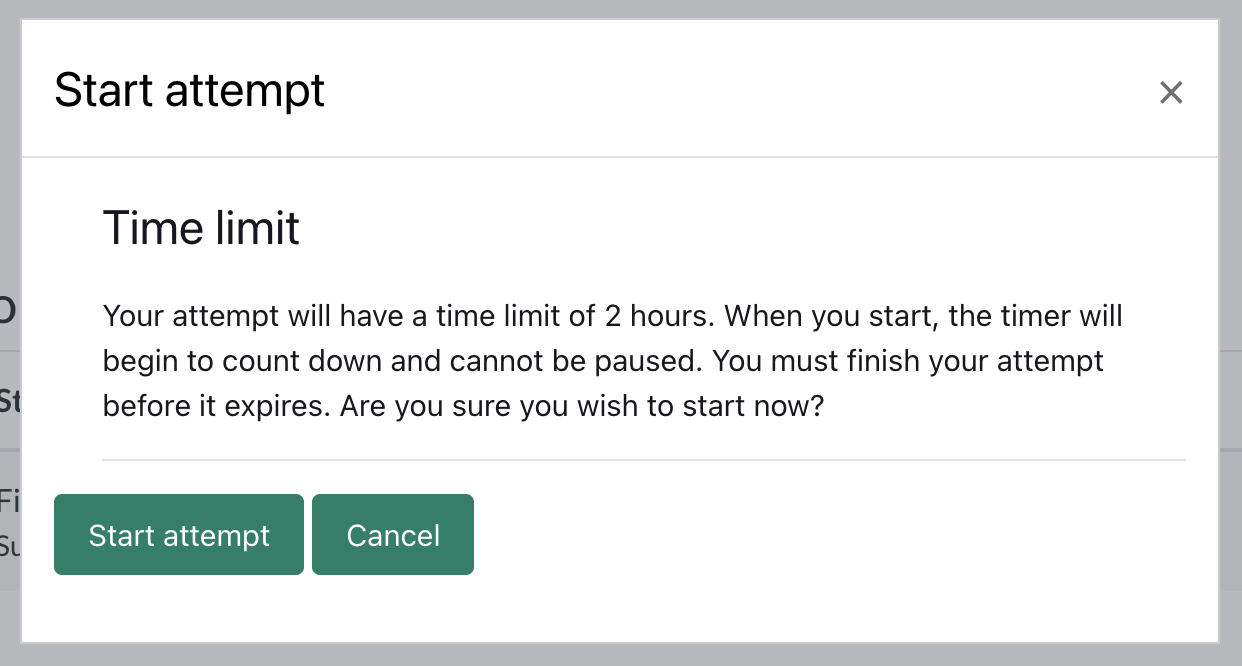
- Once on the exam page, you'll see a prompt to download the browser extension before you can continue. Check the checkbox and click the Get Started button.
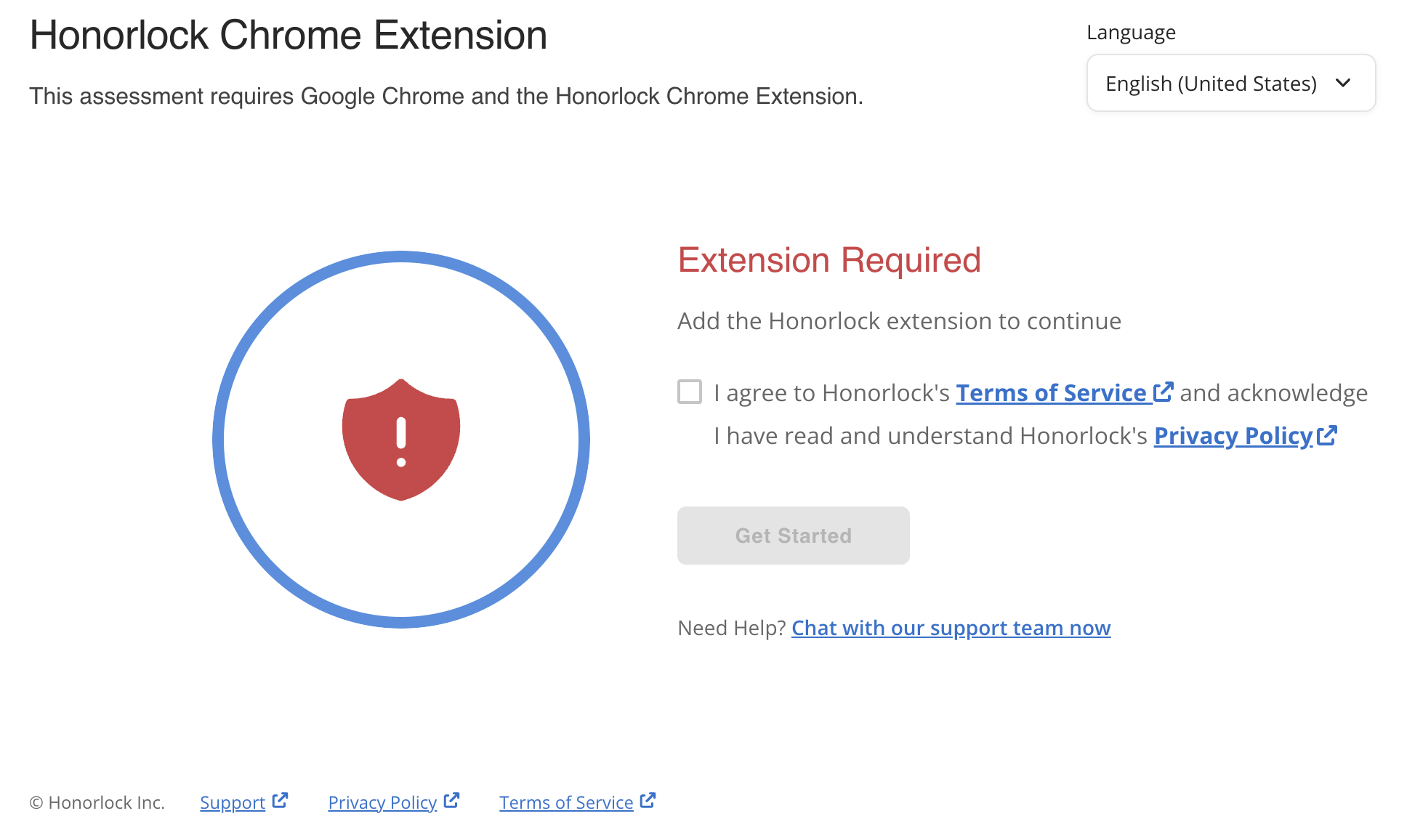
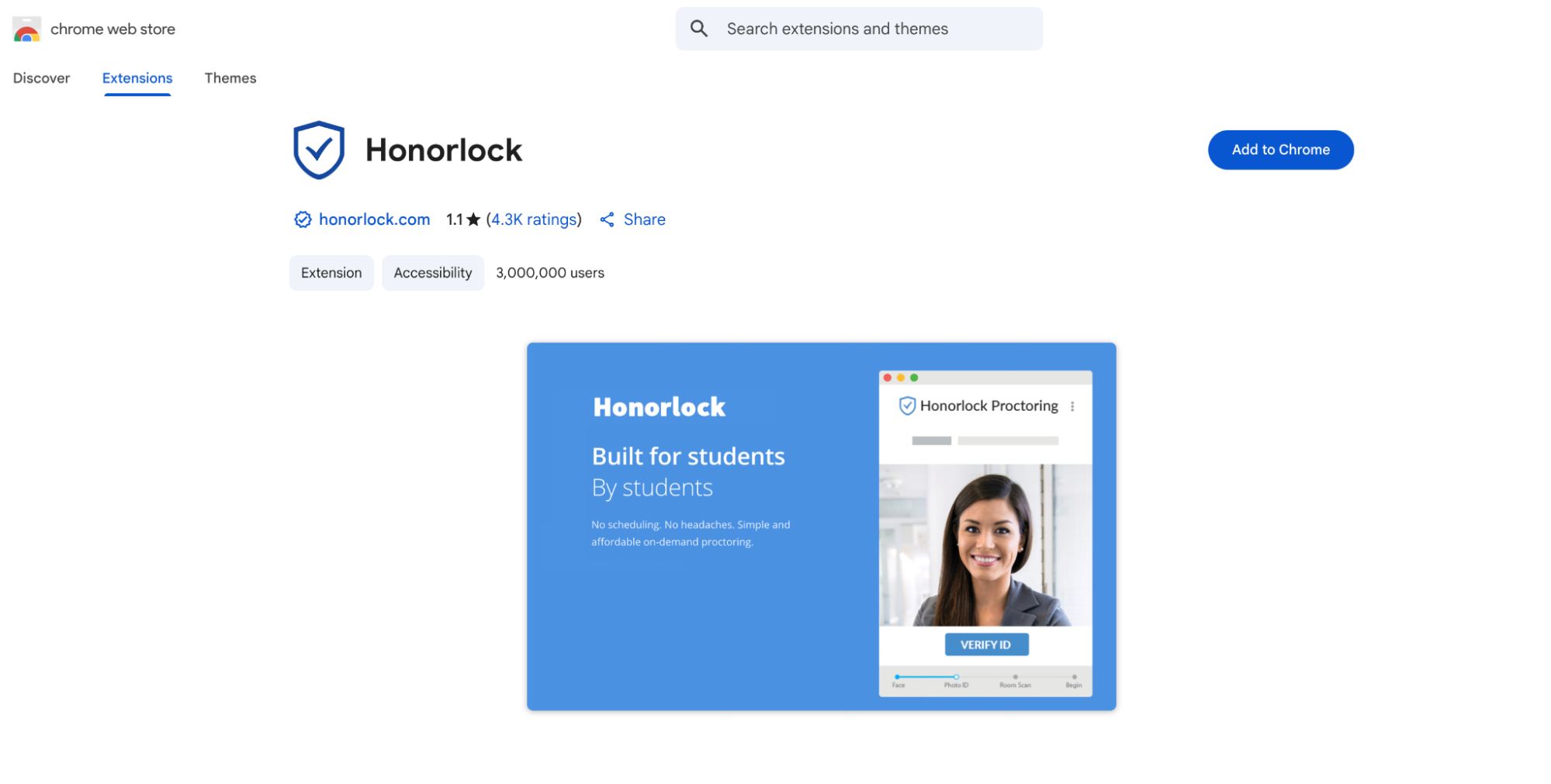
- You'll be redirected to the Chrome Web Store to add the extension to your browser (if using the Edge browser, it will prompt you to add the Chrome extension which it uses by default). Click the Add to Chrome button.
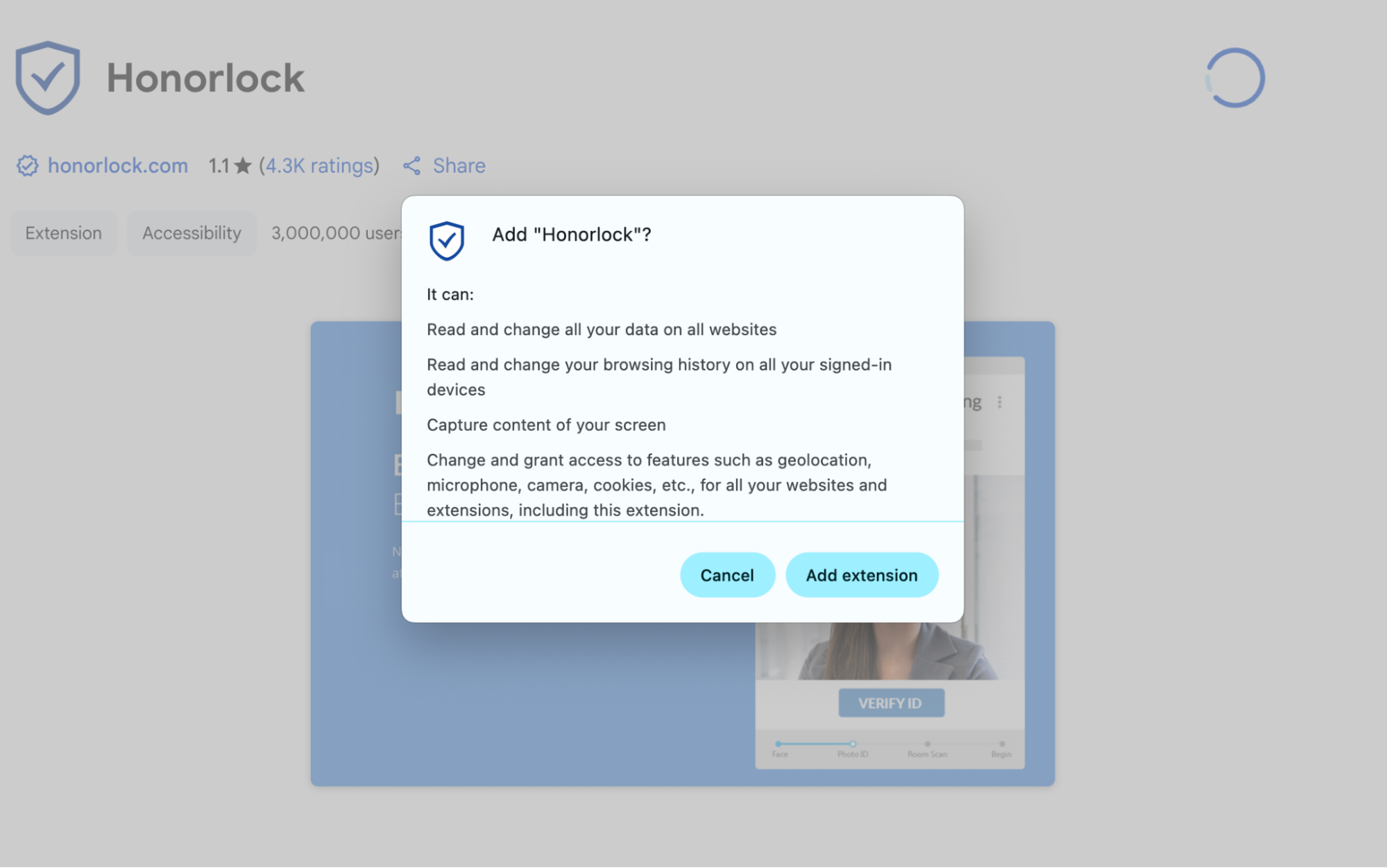
- On the following modal, click Add extension.
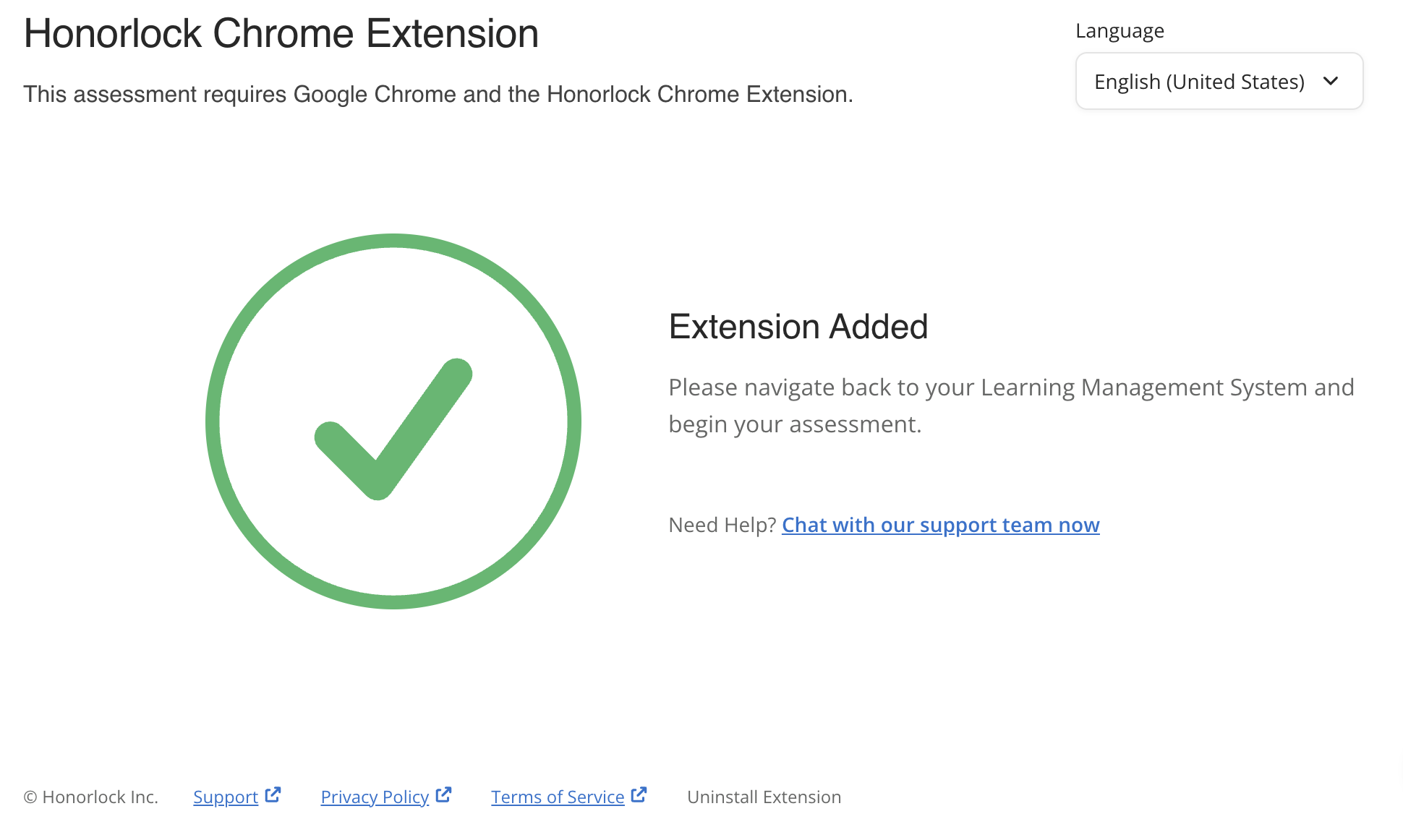
- Navigate back to Moodle and you will see confirmation that the extension was added.
- Scroll down to your assessment and click Continue.
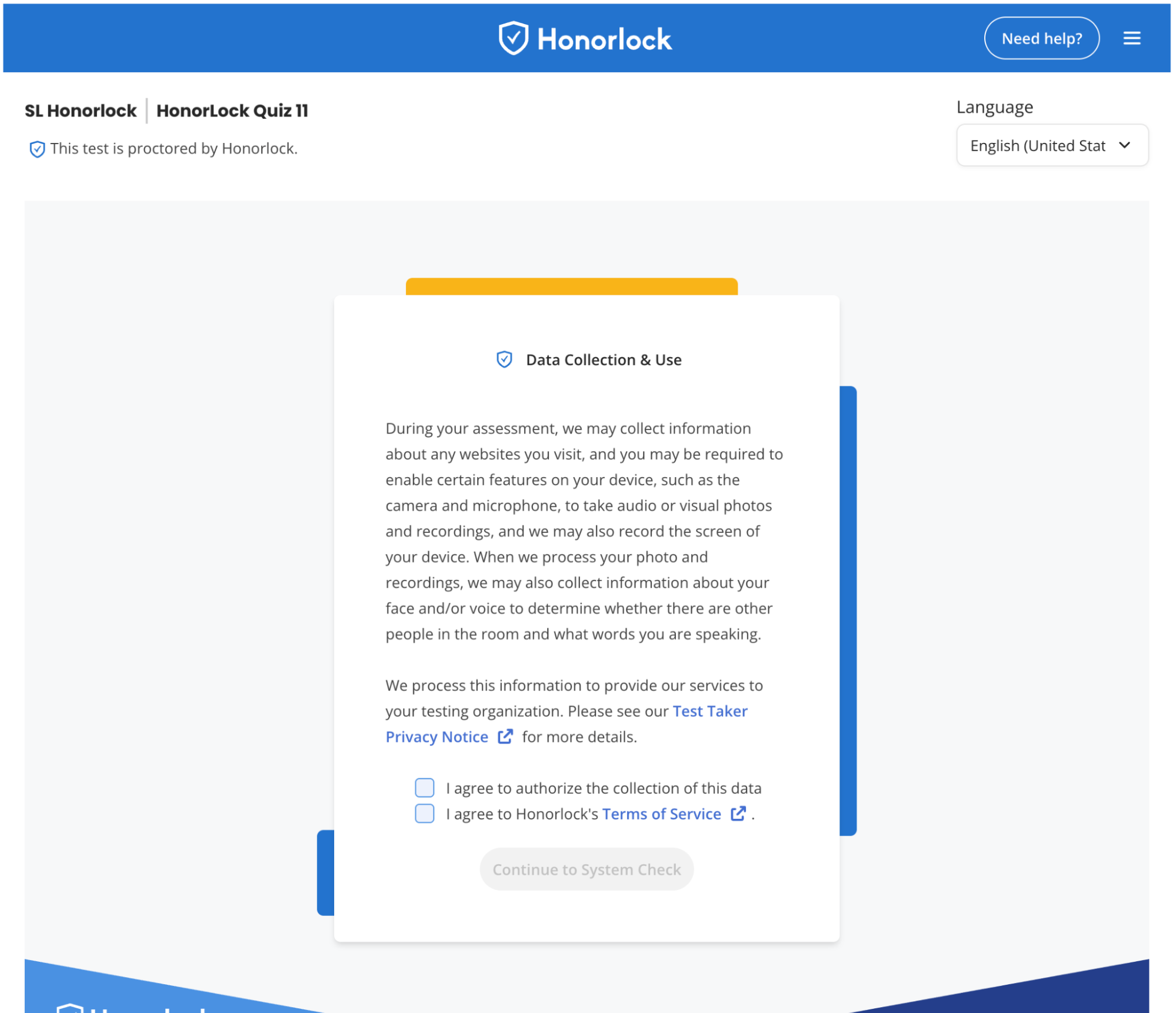
- Check off the two boxes and click Continue to System Check.
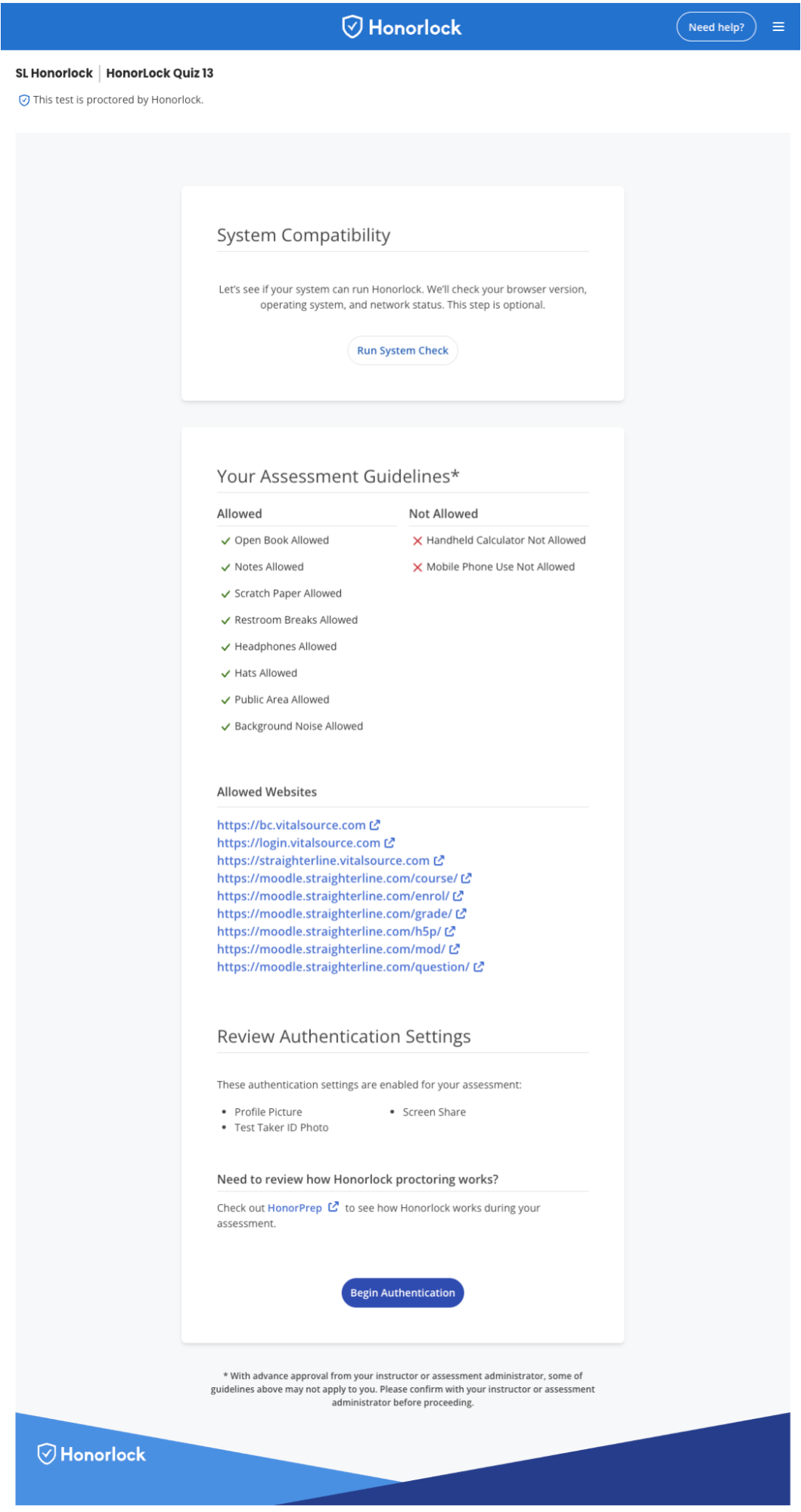
- In the next screen, you can run an optional system check to ensure your browser, operating system, and network status meets the requirements to start the exam. You will also be able to review:
- Your assessment guidelines as to what is allowed during your exam
- Allowed website/URL links you can visit during your exam
- Authentication settings enabled for your exam
- Click Begin Authentication to continue.
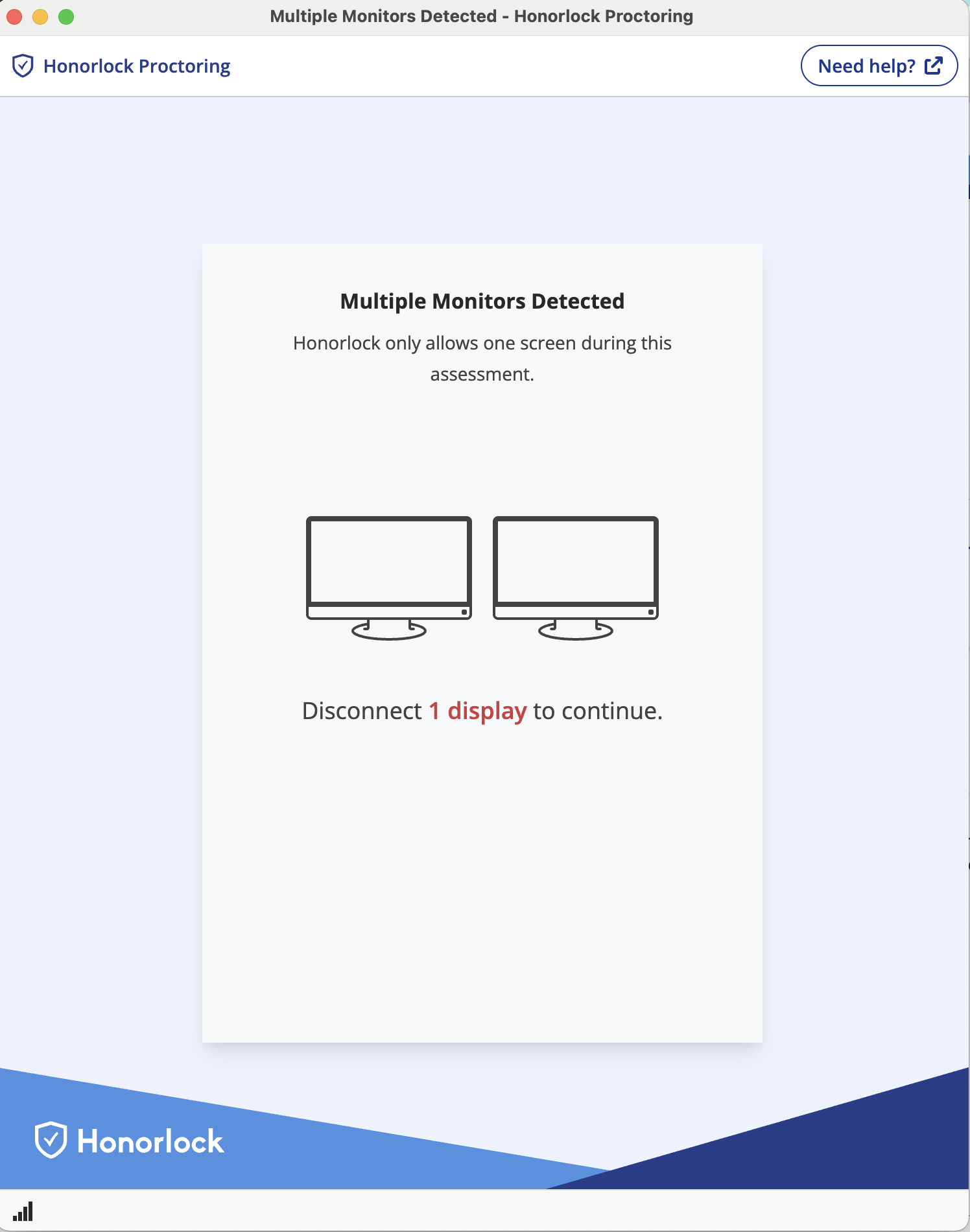
- You will be prompted to disconnect your second monitor before you can continue (if applicable).
- You will be prompted to close all other tabs and disable any browser extensions that could be used to your advantage during your assessment (see screenshot below as an example). Click Close Tabs & Extensions.
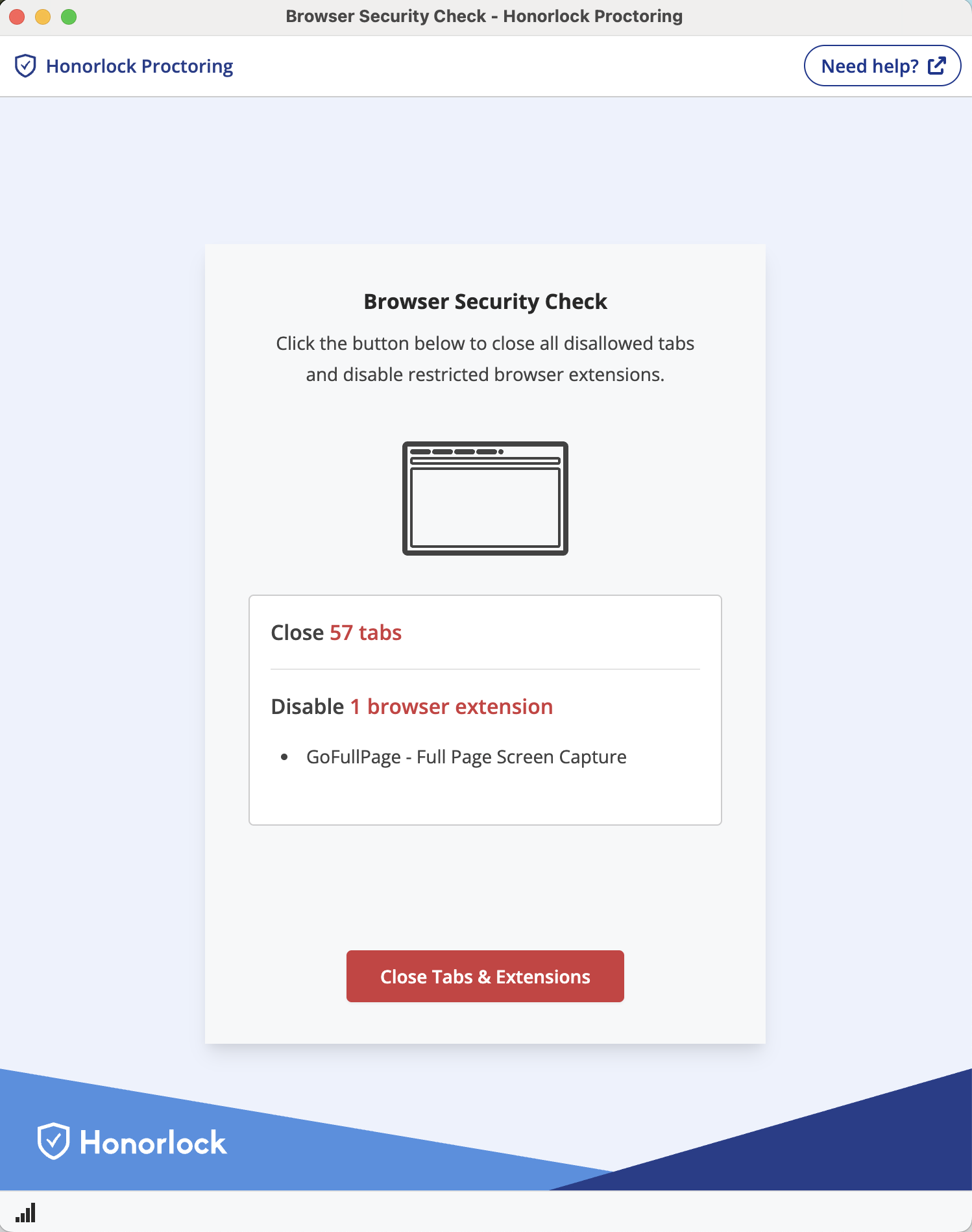
- After taking these actions, you will proceed through the authentication process based on your exam's configurations. Depending on your exam configurations, this could include:
- Photo Capture
- ID Verification
- Room Scan
- Once complete, you'll see a notice about Honorlock's Browser Guard. Click Continue.
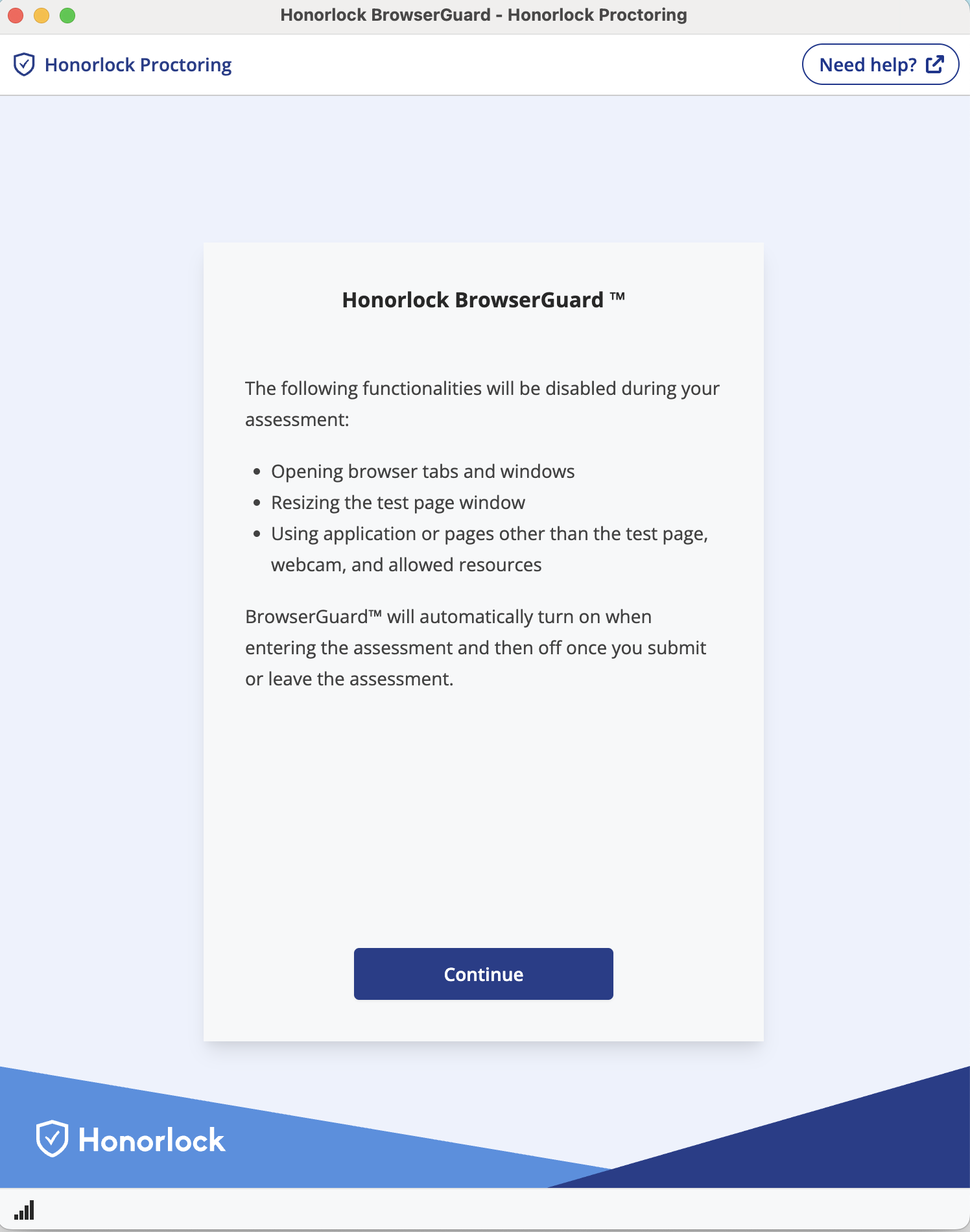
- You'll then see another notice about Honorlock's Privacy Details. Click I Understand.
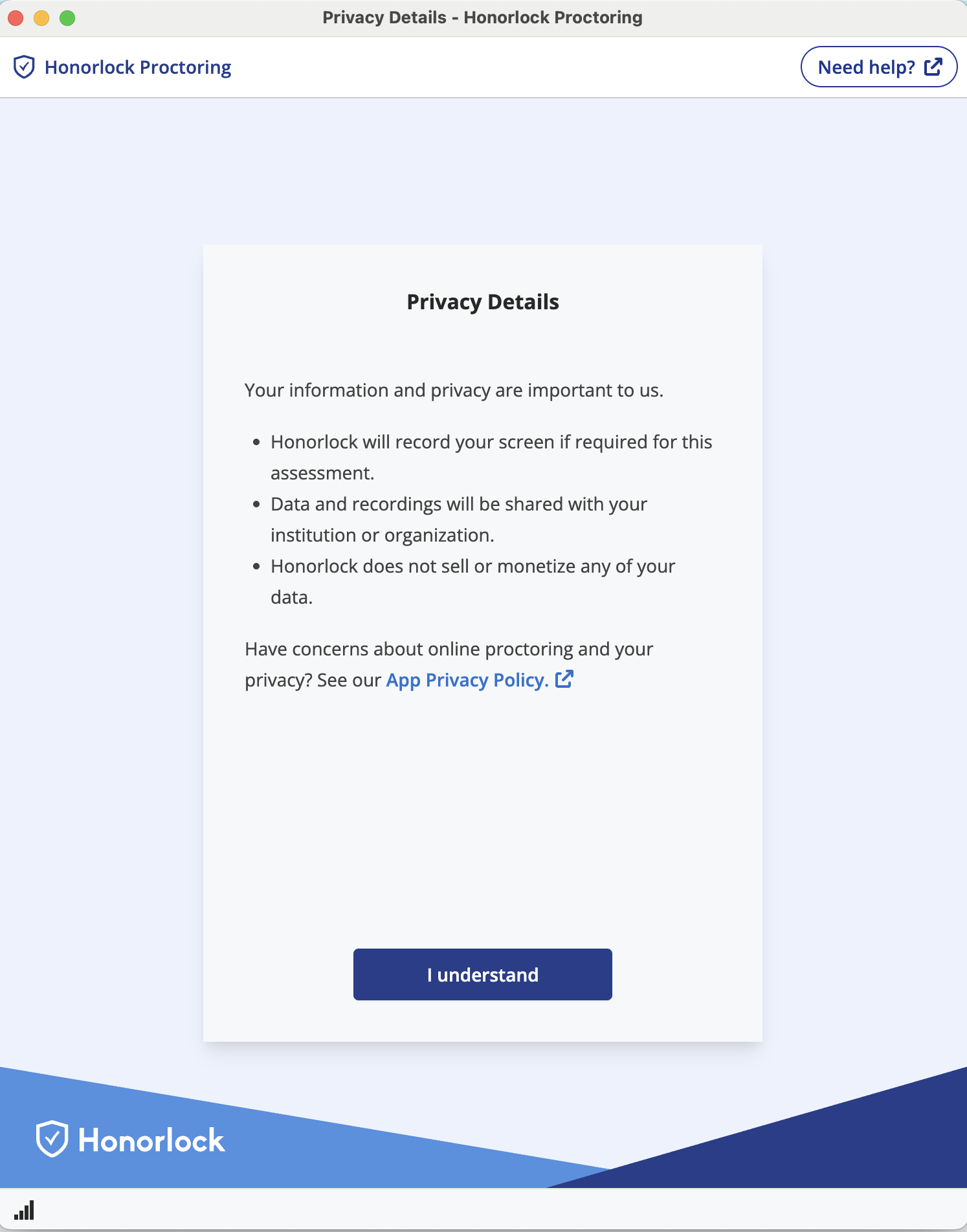
- You'll be asked to start sharing your screen for the duration of your exam. Click Continue and then share your screen.
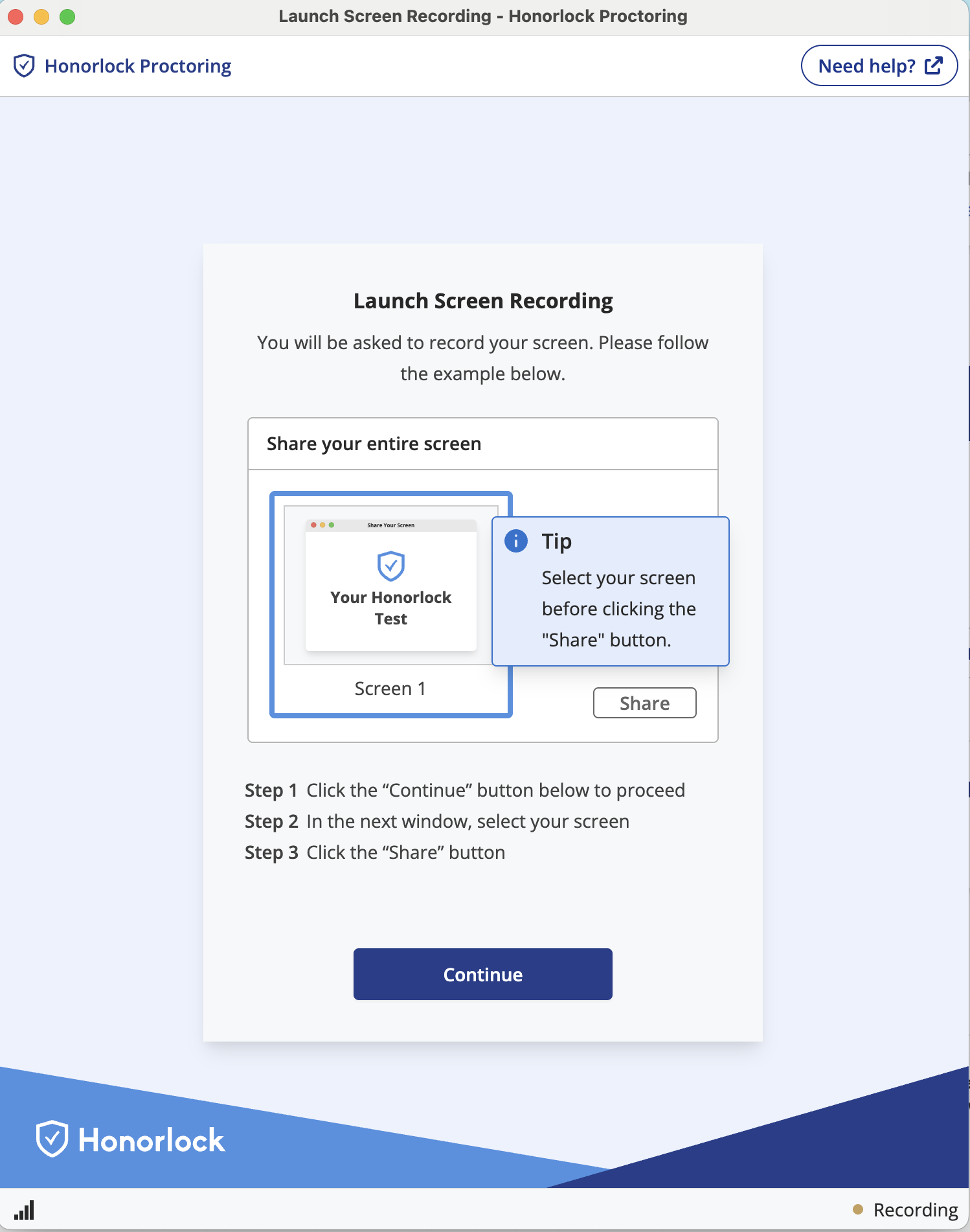
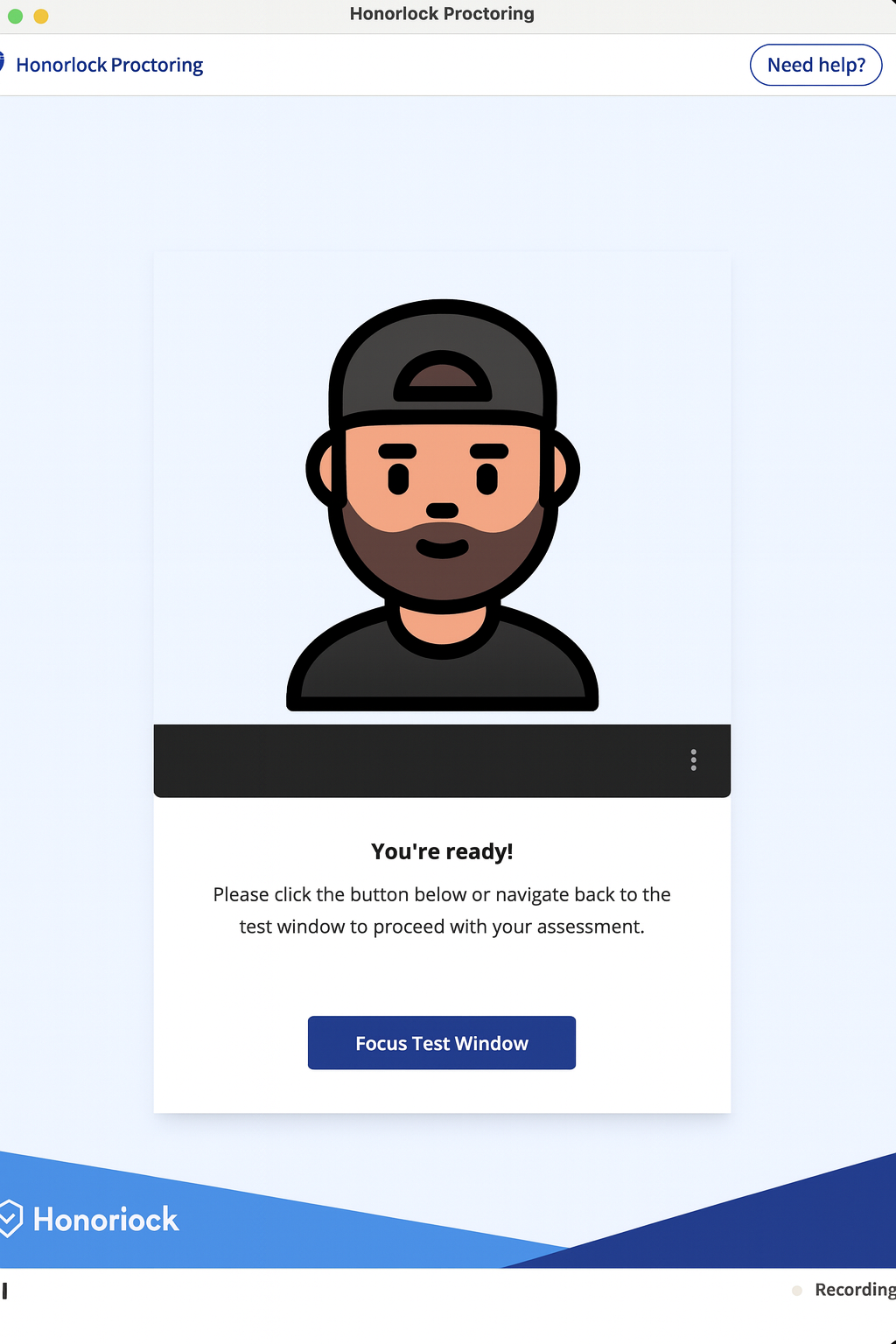
- You'll see the following screen to let you know that you're ready. Click Focus Test Window.
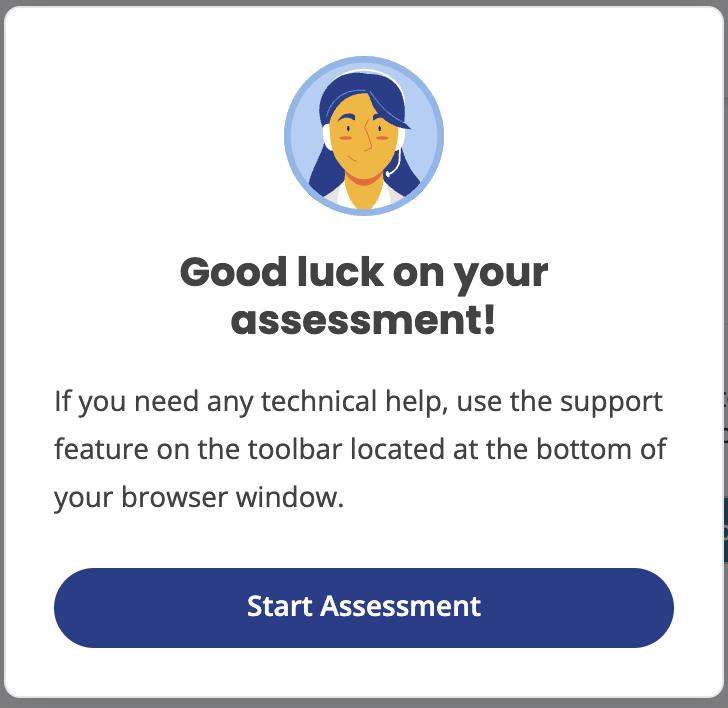
- After that, you'll be redirected to your exam with a small popup letting you know you're ready to start your assessment. Click Start Assessment and get started!
Important Notes
When you start your exam
- Your exam timer will not start until after you complete the authentication process and start your exam.
- You will not need a password to access your exam.
When you re-enter your exam
- You are allowed to navigate throughout your Moodle course during your open book exam. If you do this during the exam window, you may re-enter your exam but will need to go through the authentication process again. Keep this in mind as the authentication process could take a couple of minutes.
Important Tips
- Download the browser extension now so you're ready for your exam.
- Close all other programs before starting your exam.
- Ensure a strong internet connection for the duration of your exam.
- Run a system check before your exam to confirm that your device meets Honorlock's technical requirements.
Troubleshooting
If you encounter issues:
- You can click the Live Chat button in the bottom right corner to chat with a real person from Honorlock to help troubleshoot the issue.
Exams: How to Prepare for my Final Exam?
Final Benchmarks and Honorlock
All final cumulative Benchmark exams will require Honorlock, a browser-based examination integrity tool. Honorlock helps us protect the integrity and credibility of learning achievements by ensuring that all students complete assessments under the same secure, fair conditions—regardless of where or when they take their exams. Honorlock supports this commitment while respecting individual learning experience: exams remain open-book, students retain access to authorized course materials, and StraighterLine’s self-paced model provides continued flexibility.
What will students need to get started?
- A laptop or desktop computer (tablets/mobile devices not supported)
- Chrome browser with Honorlock extension installed (You will be prompted to install the extension on your device when you first access an Honorlock exam)
- Functional webcam for identity verification
- Valid government-issued photo ID
- Single monitor only (external monitors must be disconnected)
- Stable internet connection
The exam timer begins only after authentication is complete. All final Benchmark exams remain open-book, and students may access authorized course materials during the exam. However, please note: the exam timer will count down as students search for answers in the open-book course/notes. The exam timer cannot be paused once the exam has started.
Exams: What are Assessments?
StraighterLine courses may include any combination of the assessment types described below. Review the descriptions to learn about each type, then review the Course Evaluation Criteria to understand how your learning will be measured in this course.
What are Benchmarks?
Benchmarks test your mastery of course concepts. You have 3 attempts, and your highest score counts. Note: Cumulative Benchmarks (final exams) only allow 1 attempt.
What are Capstones?
Capstones are project-based assessments that help you apply concepts to real-world scenarios. You have 2 attempts, and your highest score counts.
What are Checkpoints?
Checkpoints are quick knowledge checks on important course concepts. All are open-book, and most have 1-3 attempts.